


Good news - I might open up my Gen I and have a play now


Good news - I might open up my Gen I and have a play now
2 x ALPriority (Quint) with STi-R+ and BT/HiFi/GPS integration | V1C (sold) | Bel RX65 S7 | 2015 Intl Redline Pro-A (sold) | Uniden R3 | Uniden LRD950 (sold) | Stalker Lidar | UltraLyte LRB | Kustom Raptor RP-1 2 x K band, 1 x Ka band antennas | Decatur Genesis-II K band |
melbVt (05-09-2014)
Sorry to get you all excited FAIL no luck LOL! It is still in MPH yet I can see KPH when I turn it on, I tagged a cars in 60KM zone and was averaging 35 to 45MPH = 60 to 70MPHOriginally Posted by winterbrew

Now I tried taking photo to show difference as I don't have squelch etc found a good pic of th3e same keys to give everyone a clearer Idea,
I think I mite need open it up and try the pin thing ,
Will sus it out as in the box came sheet paper saying it has Metric operation Setup menu selectable,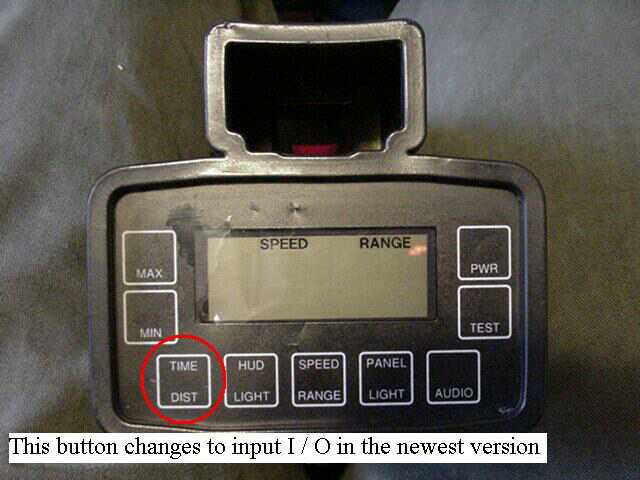
Last edited by melbVt; 05-09-2014 at 12:07 AM.
winterbrew (05-09-2014)
Here's a vid from one of the RDF guys on how to change the EU km/h version to measure in mph ;
2 x ALPriority (Quint) with STi-R+ and BT/HiFi/GPS integration | V1C (sold) | Bel RX65 S7 | 2015 Intl Redline Pro-A (sold) | Uniden R3 | Uniden LRD950 (sold) | Stalker Lidar | UltraLyte LRB | Kustom Raptor RP-1 2 x K band, 1 x Ka band antennas | Decatur Genesis-II K band |
melbVt (05-09-2014)
#3 CHEERs for winterbrew! CHEERS Cheers Im in KPH
Last edited by melbVt; 05-09-2014 at 01:05 AM.
winterbrew (05-09-2014)
So just to summarise;
You've got a Gen I with flat buttons (no menu button), as per your post above
You followed the YouTube video, but pushed the 'Time/Dist' button on the Gen I, instead of the 'menu' button on the Gen II in the key press sequence
You're now in km/h
2 x ALPriority (Quint) with STi-R+ and BT/HiFi/GPS integration | V1C (sold) | Bel RX65 S7 | 2015 Intl Redline Pro-A (sold) | Uniden R3 | Uniden LRD950 (sold) | Stalker Lidar | UltraLyte LRB | Kustom Raptor RP-1 2 x K band, 1 x Ka band antennas | Decatur Genesis-II K band |
melbVt (05-09-2014)
 Posting Permissions

 Reply With Quote
Connect With Us